Setting up my terminal is one of the first things I do on a new laptop. Before I clone any repos or install project dependencies, I'm picking a color scheme and tweaking my prompt. I've done this enough times that I should have the whole process documented somewhere, but I never do. So this time, with a new MacBook Pro on the way, I'm writing it down.
The journey through terminals
I used iTerm2 for a long time. It did everything I needed: profiles, split panes, search, good color support. I don't even remember having a specific complaint about it.
At some point I tried Hyper, Vercel's Electron-based terminal. It looked gorgeous out of the box. Very much built for people who live in web tooling and want their terminal to feel like it belongs in that world. I used it for a while, and honestly I don't remember what moved me off it.
Then Warp came along, and I was genuinely curious. It rethinks how a terminal works: blocks of output you can interact with, AI built in for suggesting commands, a modern text editor feel. And I think Warp is cool. But I found myself not really using the AI features, and at this point there are so many tools with AI baked in that having it in my terminal too just felt like too much. I didn't need another place offering to help me write a command. I needed a terminal.
That's how I ended up on Tabby. It's open source, cross-platform, and just cleaner. Less going on. I could probably go back to iTerm and be fine, honestly. But Tabby's working, and I like it.
There are other terminals people swear by that I haven't spent real time with. Alacritty and Ghostty both have followings in the "fast and minimal" camp. Kitty if you want something feature-rich without the bloat. The terminal space has gotten surprisingly crowded. I just wanted something that didn't ask anything of me.
What I actually care about in a terminal
I'm not doing anything exotic. I open my terminal to navigate files, spin up local servers, run Python, maybe check git status. When I was writing more code day to day, I used it for Jupyter Notebook and Python's interactive REPL, which gives you multi-line support and syntax coloring right in the terminal. These days I'll still pop open a Python session for quick validation work, but the heavy lifting has shifted.
What I care about is how it looks and how quickly I can orient myself. A color scheme with some pink or purple in it. A prompt that tells me where I am, what branch I'm on, and what time a command ran, without being overwhelming. Tab completion, fuzzy history search, autosuggestions as I type. I want to sit down, see a clean prompt, and know exactly where I left off.
The actual setup
Two layers make this work: Tabby handles the terminal emulator side (colors, hotkeys, window behavior), and Zsh with a handful of plugins handles the shell side (the prompt, completions, the typing experience).
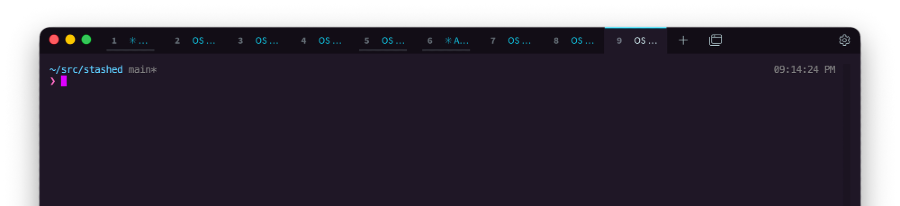
Tabby config
Tabby stores everything in a single config.yaml file. On macOS that lives at ~/Library/Application Support/tabby/config.yaml. Here's what mine looks like for the parts I care about:
terminal:
  colorScheme:
    name: Tabby Default
    foreground: '#cacaca'
    background: '#171717'
    cursor: '#bbbbbb'
    colors:
      - '#000000'
      - '#ff615a'
      - '#b1e969'
      - '#ebd99c'
      - '#5da9f6'
      - '#e86aff'
      - '#82fff7'
      - '#dedacf'
  lightColorScheme:
    name: WildCherry
    foreground: '#dafaff'
    background: '#1f1726'
    cursor: '#dd00ff'
appearance:
  colorSchemeMode: auto
The dark scheme is a near-black background with soft, warm colors. Pinkish reds, lime greens, sky blues, and a purple that shows up when I need it to. The light scheme is WildCherry, which is actually a deep purple, not light at all. Magenta cursor, gold accents. I set colorSchemeMode to auto so it follows my system appearance.
The other thing I use constantly is Ctrl-Space as a global toggle. Tabby drops down from the top of the screen like a quake-style console. I'm in and out of my terminal dozens of times a day, and reaching for the dock or Cmd-Tab every time would drive me crazy.
hotkeys:
  toggle-window:
    - Ctrl-Space
Analytics are off, the welcome tab is off. That's about it for Tabby. The config file is small and portable, which is the whole point.
Zsh and the prompt
The shell side is where most of the personality lives. I'm on Zsh with Powerlevel10k as the prompt theme, configured in the Pure style: two lines, minimal, with the snazzy color preset.
# Line 1: directory, git branch, and how long the last command took
# Line 2: virtualenv indicator and prompt character
# Right side: current time
The prompt colors are the snazzy palette: cyan (#9AEDFE), magenta (#FF6AC1), yellow (#F3F99D), blue (#57C7FF). The timestamp sits on the right side of the first line. When I'm scrolling back through a session, I can see exactly when I ran something, which turns out to matter more than I expected. Powerlevel10k also uses transient prompts, so previous commands collapse down to just the prompt character, keeping the scrollback clean.
Plugins
I keep it to two:
zsh-autosuggestions shows a ghost-text suggestion as you type, pulled from your history. The suggestion is dimmed (fg=8) so it doesn't compete with what you're actually typing. Hit the right arrow to accept it.
source ~/.zsh/plugins/zsh-autosuggestions/zsh-autosuggestions.zsh
ZSH_AUTOSUGGEST_HIGHLIGHT_STYLE='fg=8'
zsh-syntax-highlighting colors your command as you type it. Valid commands show up green, bad ones red, strings get quoted. You catch typos before you hit enter.
source ~/.zsh/plugins/zsh-syntax-highlighting/zsh-syntax-highlighting.zsh
Between these two and Zsh's built-in completion (menu select with case-insensitive matching), I get tab completion, history search, and visual feedback without installing a framework like Oh My Zsh.
Python-specific bits
Since I'm in Python a lot, the config does a few things to keep virtual environments from becoming a headache. There's an auto_venv hook that activates a .venv directory when I cd into a project and deactivates it when I leave. And a pip wrapper that refuses to install anything if there's no virtualenv active:
pip() {
  if [[ -z "$VIRTUAL_ENV" ]]; then
    echo "⚠️  No virtualenv active"
    return 1
  fi
  command pip "$@"
}
This has saved me more than once from polluting my global Python.
Moving it to a new machine
The whole reason I wrote this is that I'm getting a new laptop and want to transfer everything. It comes down to three files:
~/Library/Application Support/tabby/config.yamlfor the terminal emulator~/.zshrcfor the shell configuration~/.p10k.zshfor the Powerlevel10k prompt theme
Plus the two plugin directories under ~/.zsh/plugins/. Copy those over, install Tabby and Powerlevel10k on the new machine, and everything should look the same.
I keep saying "should" because this is always the part where something doesn't quite transfer. A font is missing, or Homebrew installed to a different path, or the prompt looks wrong until you realize you forgot to install the Nerd Font. But the config is the hard part, and having it written down means I'm not trying to remember what I did six months ago.
What's a terminal even for now
Something that came up while I was thinking about this post: I'm not sure what the terminal's role is going to be in a year or two. When the work is increasingly about writing specs and letting agents generate code, or vibe coding your way through a prototype, the terminal starts to feel like it belongs to a different era.
But I still set it up first on every new machine. There's something about having a clean, colorful prompt that signals "this computer is mine now, and it's ready."
The full config is on GitHub: terminal-config.